Dante Integration: Flexibility in Radius NX Systems
Part 4: The Radius NX and Dante. How and Why.
As mentioned in the last post I installed a Dante module into one of my Symetrix Radius NX 12×8 units, and I requested the module when I ordered the fifth unit. Dante is my primary audio routing between studios and the TOC (technical operating center), also known by industry folk as the shop. This is all fed into a four frame SAS 32KD. Dante is also used between studios as necessary. If I take a peak at my Dante Controller, there are now 70 devices on the AoIP network. Surely this explains why the addition of the Dante modules. The other reason goes back to the previous post, flexibility. The justification of purchasing the Radius NX 12×8 units included using them for processing the mics located in production studios in addition to the on-air control rooms.
As flexibility was key to installing the Radius NX units, the concept for expanding on the normal installation to a more complex and flexible system became apparent. I can save money by using the units to their full extent. Companies like the phrase “save money”. Do not get me started on companies and their lack of interest in a sound infrastructure. (Unintended pun there!) Saving money was also key in the long term knowing that I have many other Aphex Channels which will or have failed in the last few months, and it is not worth the time and effort to repair or build new power supplies for them. Incorporating a Dante module, a Brooklyn III, expands the Radius NX to an addition 64 channels of I/O (Inputs and outputs). What does one do with that additional I/O? Add production room mics!
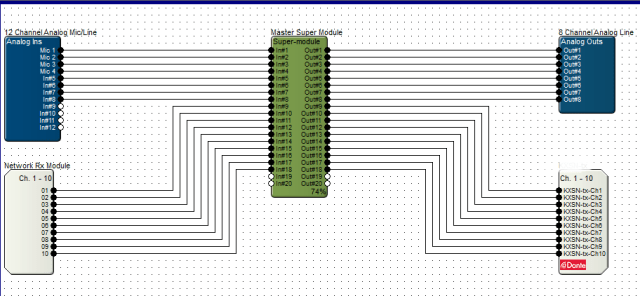
The initial proof of concept arose from the fact units were failing and the replacement units stack was thinning. I requested the purchase of a Dante module to demonstrate the concept, though at first was very basic. The purchase goes through Symetrix so the module is prepared for their device, plus they test them and install the firmware if it is modified for their individual device. Note that some manufacturers do not need to modify, while many make sure they work with their APIs. Once the module arrived, it was time for the installation.
Installation was actually very easy. The Radius NX has a slot conveniently located under the unit cover. In the slot is an existing time clock module which gets removed and replaced with the Dante module. Upon power up, the hardware was happy and looking good, so back in the rack it went. In the Symetrix Composer the hardware was discovered, but I had some issues with the configuration of the I/O. First step in such troubleshooting is to verify software versions, and sure enough there was a new version of Composer online. After the update everything appeared as expected. I use this these situations as learning and experience since purchasing a unit with everything installed and working does not give one the full experience.
Configuring the module was not too bad. Just a little learning curve. I did learn that configuring the receive through the properties within Composer will recreate the Dante cross point if the unit is down for any reason. As I moved forward I also discovered through documents online through Symetrix one does not need to do this by unchecking a checkbox. The reason will be discussed later. I do like both methods, and going back to letting Dante Controller do its job at my location seems to be the solution. The device receiving from the Radius NX cross point is created within the Dante Controller, and that works as expected like any other Dante cross point configuration.
The proof of concept test was done without using a microphone as it was the most basic of tests. In addition it gave me a chance to quickly look at the SAS Bravo and their internal processing/FX capabilities. The test block diagram shows how basic the test was, and represents the next level for a microphone. It is basically the SAS Bravo sending audio to the Radius NX, and the Radius NX sending back to the Bravo after processing. I looked how easy was it to setup, and how noticeable was the latency, if any. According to the Dante Controller, the latency from the Bravo to the Radius on average is 342 microseconds. The other way is 352 microseconds. The round trip with DSP comes under 1ms. Listening to the test audio and a quick, though double processed, mic test, the audio was listenable. If there was latency issues, the average person would not notice.
Then a couple of weeks ago we had an “oh S*&t” moment. A visit from another market needed to go on air from our facilities. The obvious choice is the voice booths setup for such situations along with remote voice tracking. I discovered that yet another pair of Aphex Channels had passed away. Well, with what I had on hand I took the situation and decided to take the proof of concept to the next level. Though I did not have a Dante enabled mic pre-amp, of which I have two on order now, I knew I could use an existing basic mic processor as a pre-amp with all processing disabled, route that to my SAS frame, and send it to a Radius NX via Dante. Then bring back the source to the studio. Here I was concerned that latency may become an issue due to the path and conversions. After some tweaking, I was satisfied this will fly, and in the worst case scenario we would move to another studio. The show ran without a hitch, and the talent did not have any issues. He was actually impressed how smoothly all went. He never knew his mic was being processed two rooms away.
The concept works. Next will be the installation of the Dante enabled mic preamps. They are on the way, so we will know soon!
 Tech Notes from the Field