Archive
Preparing The Studio
We are building a new studio on the cheap. I use cheap as a relative term as it is a tight budget with some high-ticket items, e.g. we picked up our SAS Rubicon SL consoles this week, the studio is an IAC enclosure, the HVAC is a Liebert. After this it is relatively cheap.
First issue will be noise from the HVAC for the producer who participates on the air. We did not have money to “enclose” him. A minor issue, but a concern none-the-less. We have ideas to minimize the noise. Insulation from Home Depot is one of them. The other is my purchase of Primacoustic panels. We will see how this works.
The second issue is sources into the SAS system. I have two RioLinks and I plan to use nearly all inputs and outputs. Though the producer is separate, instead of two independent “rooms” and consoles we are installing a “split” console setup. One SL-24 and one SL-8 essentially creating a 32-channel console. The producer’s SL-8 will have it’s own monitoring controls, but is able to feed air directly and work as a production workstation while on air. We begin configurations next week.
Third issue is lack of multi-pair plenum into the space. 200-feet of plenum 25-pair cable was not in the budget. My solution here is, once again, SAS. As most of the need for the multi-pair is control I opted to install a SAS GPI-1600 in the TOC and utilize the RioLinks’s Optos and relays to control such things as the LED sign controller. The other main item to be controlled is the profanity delay. Now all this information will be on the fiber between the RioLink and 32KD frame.
As this project now moves into the installation stage, we will see where it goes. Would you believe we had to install temporary 4-foot fluorescent fixtures in the studio? If you have read any of my tweets you know the city also bent us over backwards with close to $4k in permit fees. Now that the carpet is in and we are about to receive final inspection from the city I look forward to finishing this thing up. I still have more electrical work to perform and a bit of creativity to come in making everything work smoothly. I hope it is all worth the effort of which I am receiving very little credit.
HVAC: What?
The question of the day is why do HVAC contractors seem so “secretive” of their trade? Sure us broadcast engineers are good at learning these things, but do they skirt the issue at times?
This one is an interesting situation. The building does not want 24 hour units on their system. We added our own thermostat, but we are on the building water system. Our lease says the building is responsible, but we contract service as they are more responsive. If you read the posts of last night it was fun. Up, down, up, down. What?
The point is no one knows the exact cause, so we do a little here and a little there. We find the trap was installed wrong. Repaired. It worked all night! We noticed the back pressure is too high, so a 2nd return duct is being added. Building water is good. I say, ” watch the controller board, it may be failing.” A day later the comment is blurted, “it could be the controller.”
What? We are all professionals and yet no one listens to the other. The “you don’t do this stuff” attitude comes out and pisses me off. One thing I can do is trouble shoot. I feel I’m pretty good at it. If I make a valid comment acknowledge it. If I’m off the wall say so. We are always learning.
Does this happen to you?
Networking VoxPro
As mentioned in a tweet I wish to share how we network the Audion Labs VoxPro. It seems to be quite simple, though from my discussions some have issues. We try to keep things as simple as possible and at times we are forced to figure things out.
The Network:
Set up each of your machines as required for the VoxPro. We currently use Windows XP. Setup a user account to log in to the machine. This is necessary when it comes to the network connection and server authentication. Also consider auto login to make it simpler. Note: This is a machine or computer login, not a VoxPro user account. That comes later.
So, a computer will have a name, StudioAVP: a user, VoxPro1; and a user password, voxpro.
The network is a basic client-server network. Connect all workstations to a switch. Connect the server to the switch. We use a Gigabit switch and 1Gb NICs (network interface cards). Choose a switch with good processing speed and memory as you will be pushing a lot of data. The file server we use is fast and runs Windows Server 2003. We also have a 1.5TB RAID 5 array for storage. Note: we “home run all workstations to a single switch as we found a switch-to-switch connection caused some oddities most likely caused by the switch itself. Add user accounts to the server so it can authenticate. Allow access to the “drive” that will store the files. This is a folder you can name VoxPro. Map the workstations to this folder. For example you will map V:\ to this folder. VoxPro from what we found will recognize a mapped drive, but will not work as well with an UNC, Universal Naming Convention.
Once all this is done, you can now “create” the user list for your VoxPro computers. Each VoxPro has a file on the local drive called users_local.inf. This is where VoxPro creates the user paths to their files when you make them within VoxPro. Instead of doing additions within the software, I edit this file directly using Notepad. If you have multiple stations you can comment out the users from each local machine, but allow access in a production room. I’ll show an example below. Once this file is created/saved, you can open up VoxPro and the list of users is now present. When selected for the first time, the necessary folders are created on the server and the audio will now be stored on the server and available in any room. This users_local file is necessary on all VoxPro computers and the paths must all be consistent. I save the master copy on the file server for easy reference and editing. If you add a new workstation, you copy this file over and edit appropriately for that workstation. Keeping a master up to date is important, too, so when you make changes, make sure you updated that master copy!
Example of the users_local file:
For the master file I create something as follows:
;KXYZ
V:\KXYZ\Joe
V:\KXYZ\Mary
V:\KXYZ\Morning Show
;WXYZ
V:\WXYZ\Morning Show
V:\WXYZ\Afternoon Drive
V:\WXYZ\Traffic
Etc. We have 3 stations, so I have 3 commented sections for each station with the users under that. A ; before a line is the comment character. If you have a user you wish to temporarily suspend and want to keep the files, place a ; in front of that line. Once the files are saved, removed, moved, or whatever, then you can delete the line. All gone.
The above example is what you would see in a production room. As there are 2 users named “Morning Show”, it is a good idea to give them unique names as in a common room like production, the list will show 2 users with the same name though the file location is different. To use this file in the WXYZ control room (on air room) and restrict another station access, comment out the lines with users restricted in that room:
;KXYZ
;V:\KXYZ\Joe
;V:\KXYZ\Mary
;V:\KXYZ\Morning Show
;WXYZ
V:\WXYZ\Morning Show
V:\WXYZ\Afternoon Drive
V:\WXYZ\Traffic
Only those users not with ;’s will be visible.
Note that I always create through the software the administrator account and generic “user” account. These are on the local drive. The Administrator account is password protected.
Speaking of password protection, this information is saved within the folder of the specific user. If someone creates a password, this password will be necessary on ALL workstation when they choose their account, so there is no need to worry about each workstation having a unique password.
One last thing to do is SHARE the folder C:\Program Files\VoxPro PC with everyone. This way you can make those copies of the users_local.inf file and access them accordingly without running around to each workstation.
Hopefully this information is helpful to all. I will attempt to create a sample network diagram and post it. I will also edit this post as I see mistakes or changes. All of this is written from the top of my head and not referencing any of our notes regarding this network. 😉 Brain exercise.
Cheers!
Digital Radio, HD Radio, Whatever You Wish To Name It….
I actually had a good time at the NAB Show this year. I met folks I have not seen in awhile. I had some good discussions and some progress was made on outstanding issues. The one topic that still amazes me is HD Radio, or digital radio. I am torn on this one as we move on into the future. I had a very interesting talk with a colleague on this very issue as our respective management take on the two opposing sides.
(Note: I will refer to HD Radio as Digital Radio as I find the HD misleading and it has no significance. IBOC is a better acronym, but many fail to know of which it refers.)
Where I work management takes on the side of absolutely no digital radio until we can make some money on it. Where my colleague works the management takes the side of put everything and anything on the digital carriers. What we have here is the the “chicken and egg” scenario. On side does not wish to start anything until proven while the other side takes it head on and uses the technology though there is no real revenue at this time. The question that arises from this is, “When does one embrace digital radio?”
From where I sit we are wasting much on having the digital carriers run. We waste power generating the carrier and we waste power cooling the site. We waste space on the equipment, and we waste time maintaining and “fixing” flaws in the system. (Read some of my previous posts or tweets.) There is no push from management to utilize the carriers nor is there any push to “market” the fact the analog is available in digital. We witness the coverage of the digital falling short of “full market” coverage, whatever that means today. We do make a few bucks on utilizing digital data, but nothing that pays for the power bills or equipment maintenance.
On the other side, the colleague mentioned has a manager who has no qualms embracing the technology resulting in HD2 and HD3 channels (note not an NPR affiliate). With the announcement of HD4 and MP3, this manager is wanting it now. Again, no real revenue is being generated, but at least there is use of the technology and some marketing. By utilizing the technology the issues I experience are amplified on him because they are in use. To me digital radio is an annoyance while to my colleague it is part of the routine.
Though the discussion on whether IBOC technology is good or bad, it is here and it does not seem to be going anywhere. At what point do stations embrace it? When all automobile manufacturers install the radios? When all radios available or produced include the technology? Again, the chicken and egg scenario. Stations and groups with money have no issue embracing digital radio. It becomes another expense that is overcome. A small market group or station has a tough time on the equipment. Music, or should I say content, delivery must be included along with the transmission equipment. It adds up. The economy may be improving, but it still does not justify such outpouring of capital.
We are now approaching the increase of power to the digital carriers. Early adopters are finding they do not have the headroom in their equipment (transmitters). Crowded markets (Southern California for example) will be unable to increase power a full 10dB, while some will not be able to increase at all. At the NAB Show I saw the asymmetrical digital carrier power levels. A “fix” for a system that was not thoroughly thought through. It can be read as a solution for stations to embrace the technology, too. I question at what point does radio convert to an all digital carrier and abandon analog? How long does the industry continue to fix it until the breaking point?
As radio approaches this new fix it runs parallel with the emerging technology of WiMax and the continued push to provide WiFi in automobiles. Radio must decide where it stands among all the new content providers out there. How radio at the station level embraces this new technology is key to radio’s future. Broadcast will, and is, just another tool to deliver a message. I believe there will be a point where radio will go all digital as a necessity and work along side all the other methods of delivering content.
Do we embrace the technology for the sake of technology or do we prepare for a new all digital future now? The one thing that you can bet on right now is that radio is still here as a public service.
Please, post your thoughts.
NAB Day 2: On the Floor
As I labeled my arrival at Day 1, this must be Day 2!
I would say it was busy on the floor, not like I’ve seen in the past, but definitely busy. One social thing that stood out is the number of people that I have not seen in years popping out of nowhere. Around every corner it was, “Hey! Long time! What’s up?” Then it ran into conversations about things: catching up. While talking with someone, another would show and next thing you have is a reunion. Social networking at its best.
When we first walked in the door we stumbled right into the Tieline booth. What a coincidence. It is interesting to see people look at your badge and recognize you; then you get to meet people who you talk with on the phone. Very cool. We spent a little bit looking at Tieline’s new iPhone app. Now this was pretty darn cool. Makes news gathering amazingly simple. You can feed real time to your G3 over WiFi or 3G networks, or record and send later. Talk about handy little gadget.
We looked at a couple of logger solutions, again. This seems to be an ongoing thing with us. For intuitive operations from an end user standpoint, I still like the OMT iMedia Logger. Where the intuitive part comes is the front-end Websecure+ storage and distribution device. As we have a number of “users” needing access to our skimmed/logged content, it keeps taking our logger down. With a device like this, we would be able create user access and store the audio on a device designed to handle high traffic volumes without needing a separate software package to install on a user’s computer.
But, we did see, actually talk with others. The Telos, or Axia, iProfiler shows promise, too. Now this one does require a software “plug-in” on user computers to access the audio, but it would make for an easy transition for some users. The iProfiler is fed using an Axia node, while the Profiler is a stand-alone box requiring sound cards. We need anywhere from 12-15 mono sources at any one time and 3 stereo feeds along with that. Crazy, eh?
I dropped by many of my normal contacts to meet and greet. SAS, Econco/CPI, and DaySequerra. We had a good meeting with Harris. From what I get is iBiquity stuff is really not designed for real-world networks in terms of transmitter sites. Network capabilities at sites vary greatly and in many cases is quite limited. We did come out of the meet with a game plan to narrow even further any potential causes of trouble. It will be fun to do this double and triple checking while building a new studio.
For Day 3, I plan on doing a bit more nuts and bolts digging. Of course that is subject to more run-ins with people! It is a shame I cannot stay an extra day to see the “toys” and technology that does not pertain to radio specifically, but does contain potential future applications. Maybe I will sneak over to the south hall early. Ha ha ha.
Enjoy!
NAB Day 1
Day 1 being the trip. Well, still waiting to head out. Had a family event in L.A. So I’m flying out of LAX. Talk about busy. Sunday afternoon at one of the largest airports. Fun people watching though.
While I wait I’m thinking of floor strategy. As we are considering a new logger, I may look at some of those. I meet with Harris in the afternoon. I also have a friend who will show me some 3D editing they have. Industry leader, too. Could be a busy first day.
See ya there! Now when will this flight fly?
Strategic Planning
A very interesting concept from a business point of view. From my geek POV I am clueless on how to present the department, especially within the hierarchy of my current location. How do I do this and what is expected?
Engineering as business. Engineering as customer service. Engineering as the fix it department.
More on this as I “work it out”. I only have 5 days until the presentation.
NAB Coming Soon
As I last posted, I am attending NAB this year. I’ll be wandering the floor Monday and Tuesday. I have two meets already planned. I will be busy. I will also blog & tweet from the floor.
As a reader of the blog I have a couple of links to share for floor passes:
One is from our friends at Nautel: https://www.xpressreg.net/register/NABS040/landing.asp?p=NV1036
The other is from the NAB itself: Visit http://ow.ly/13T8Q to redeem or register at http://nabshow.com/register with the code A913.
The show is April 10-15, 2010, so it is just under a month away. While you are there check out the Broadcast Management Conference and discover how to further monetize and manage your digital products in today’s dynamic marketplace: http://ow.ly/15xv1
I would love to attend the BMC, but I may run out of time during my two days there. Hopefully you guys and gals can make it. Make an agenda and run with it! Have fun.
Cheers!
Be Prepared
An interesting week this turned into. It started with a productive trip to a transmitter site and ended with a visit from the FCC. In the middle, well actually around this was a visit from our corporate officers and a Harris Flexstar update.
The transmitter trip was to our Aux site. In preparations for licensing we did some new remote control wiring and posting of CPs. We discovered a bad switch on the RF load, so a new one will be installed next trip. The cable bridge is still wonky and I have no idea on the repair time frame.
We had a compliance inspection from our friendly FCC. If you are prepared why be worried? We passed with flying colors and I think the inspector was taken by our nonchalance and jovial confidence. Folks, it is not that difficult to maintain EAS compliance. Run the damned things and log them. It helps when a computer does the logging. The public files is the same thing. Get a check list and start making folders and fill them with the appropriate information. Some use binders. Some scan it all and make it available online. Any way you do it, just do it.
Last night I got hit with another mysterious Harris Flexstar outage. My remote reset connection came in handy. After a nice discussion this afternoon we may be testing some more. I am so curious about the cause that I am over the frustration part, though programming has other thoughts. I am at the point where if I do not know the cause I will be disappointed. From a business side we wish we could just replace it. In any case we march forward.
Be prepared for that which you can be and within your means. Try to enjoy the adventure.
Cheers!
When Being A Tenant is Not Fun
I uploaded to Twitter a picture yesterday of a site we visited yesterday. Unfortunately this is where our Aux transmitter is. For all I know the management/owner does not know of the damage. If I can figure out how to embed a couple more pictures here I would. Basically I have left a message on a cell phone and an office regarding the situation. The latest storms broke the guy wires to the vertical supports to the cable tray that runs between a tower and the building. The tray buckled. It is still there and there is stress on the cables. One 7/8″ cable is to our STL dish. Luckily we had enough “service loop” on the building end that the cable shows no damage and we continue to receive good signal.
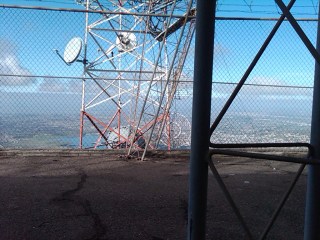
Vertical Support?
Why would a company, known tower/site management company, not respond to such a situation? I am prepared to make a couple of more calls, but this is the not the first time they have not returned a call. Just crazy.
As you can see in the picture here the supports are leaning here. You cannot really see it, but there are two in the center section that where held in place by two guy anchors.
The tray buckled as can be seen in the next photo.
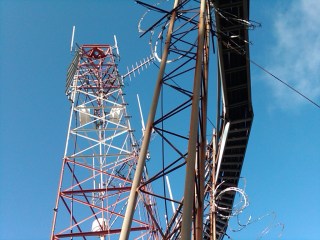
Buckled Tray
It sure isn’t pretty, but it is holding for the time being.
I would have to say this support structure has been here a while. I know it it was in in place 10 years ago. I bet it goes back 20 years. I would say repairs and upgrades are necessary. What do you think?
 Tech Notes from the Field