Archive
Dante Integration: Flexibility in Radius NX Systems
Part 4: The Radius NX and Dante. How and Why.
As mentioned in the last post I installed a Dante module into one of my Symetrix Radius NX 12×8 units, and I requested the module when I ordered the fifth unit. Dante is my primary audio routing between studios and the TOC (technical operating center), also known by industry folk as the shop. This is all fed into a four frame SAS 32KD. Dante is also used between studios as necessary. If I take a peak at my Dante Controller, there are now 70 devices on the AoIP network. Surely this explains why the addition of the Dante modules. The other reason goes back to the previous post, flexibility. The justification of purchasing the Radius NX 12×8 units included using them for processing the mics located in production studios in addition to the on-air control rooms.
As flexibility was key to installing the Radius NX units, the concept for expanding on the normal installation to a more complex and flexible system became apparent. I can save money by using the units to their full extent. Companies like the phrase “save money”. Do not get me started on companies and their lack of interest in a sound infrastructure. (Unintended pun there!) Saving money was also key in the long term knowing that I have many other Aphex Channels which will or have failed in the last few months, and it is not worth the time and effort to repair or build new power supplies for them. Incorporating a Dante module, a Brooklyn III, expands the Radius NX to an addition 64 channels of I/O (Inputs and outputs). What does one do with that additional I/O? Add production room mics!
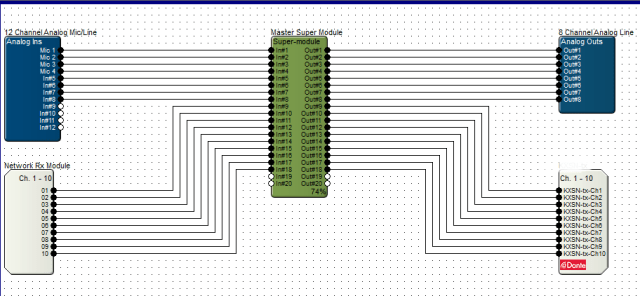
The initial proof of concept arose from the fact units were failing and the replacement units stack was thinning. I requested the purchase of a Dante module to demonstrate the concept, though at first was very basic. The purchase goes through Symetrix so the module is prepared for their device, plus they test them and install the firmware if it is modified for their individual device. Note that some manufacturers do not need to modify, while many make sure they work with their APIs. Once the module arrived, it was time for the installation.
Installation was actually very easy. The Radius NX has a slot conveniently located under the unit cover. In the slot is an existing time clock module which gets removed and replaced with the Dante module. Upon power up, the hardware was happy and looking good, so back in the rack it went. In the Symetrix Composer the hardware was discovered, but I had some issues with the configuration of the I/O. First step in such troubleshooting is to verify software versions, and sure enough there was a new version of Composer online. After the update everything appeared as expected. I use this these situations as learning and experience since purchasing a unit with everything installed and working does not give one the full experience.
Configuring the module was not too bad. Just a little learning curve. I did learn that configuring the receive through the properties within Composer will recreate the Dante cross point if the unit is down for any reason. As I moved forward I also discovered through documents online through Symetrix one does not need to do this by unchecking a checkbox. The reason will be discussed later. I do like both methods, and going back to letting Dante Controller do its job at my location seems to be the solution. The device receiving from the Radius NX cross point is created within the Dante Controller, and that works as expected like any other Dante cross point configuration.
The proof of concept test was done without using a microphone as it was the most basic of tests. In addition it gave me a chance to quickly look at the SAS Bravo and their internal processing/FX capabilities. The test block diagram shows how basic the test was, and represents the next level for a microphone. It is basically the SAS Bravo sending audio to the Radius NX, and the Radius NX sending back to the Bravo after processing. I looked how easy was it to setup, and how noticeable was the latency, if any. According to the Dante Controller, the latency from the Bravo to the Radius on average is 342 microseconds. The other way is 352 microseconds. The round trip with DSP comes under 1ms. Listening to the test audio and a quick, though double processed, mic test, the audio was listenable. If there was latency issues, the average person would not notice.
Then a couple of weeks ago we had an “oh S*&t” moment. A visit from another market needed to go on air from our facilities. The obvious choice is the voice booths setup for such situations along with remote voice tracking. I discovered that yet another pair of Aphex Channels had passed away. Well, with what I had on hand I took the situation and decided to take the proof of concept to the next level. Though I did not have a Dante enabled mic pre-amp, of which I have two on order now, I knew I could use an existing basic mic processor as a pre-amp with all processing disabled, route that to my SAS frame, and send it to a Radius NX via Dante. Then bring back the source to the studio. Here I was concerned that latency may become an issue due to the path and conversions. After some tweaking, I was satisfied this will fly, and in the worst case scenario we would move to another studio. The show ran without a hitch, and the talent did not have any issues. He was actually impressed how smoothly all went. He never knew his mic was being processed two rooms away.
The concept works. Next will be the installation of the Dante enabled mic preamps. They are on the way, so we will know soon!
Audio Over IP (AoIP)-Dante
To Audio Over IP or not to Audio Over IP. That should not be the question. The answer is a definitive yes. This should be a decision of adding another layer to the arsenal of audio options toolkit. We all still need analog and digital audio. Just add IP to that kit. Of the options available, from proprietary LiveWire and Wheatnet, to what may be considered standard, the choice is yours. Do not be fooled by AES67 claims. Think about what you want to do and why. I chose Audinate Dante. It compliments what I have and moves us into the future. And for my system it is integrated with Sierra Automated Systems (SAS) 32KD and Bravo. (It even supports AES67.) Choose wisely.
I know you have read about AoIP. I know you know about AoIP. I know you use AoIP. Any modern codec is using AoIP as we all use the Internet to feed audio remotely. The basics of creating an AoIP network is simple. You need a network. The main part of this network is your switch. Do not use a hub. Make it a good switch. Design your network for at least 1 GB. Depending what you decide on a platform, you may need a DHCP server, and possibly some high-end switches. Some will want to Subnet and use VLANs on existing networks. I am of the belief of making things simple, so I chose to create a completely independent and isolated network. I chose Dante.
What makes Dante “simple?” Many things, but the main is the fact it does not require any special hardware. No special switches. No special configurations. In addition to that it does not require DHCP. The IP addresses are automatically assigned by Dante just like the automatic addressing Windows does when a DHCP server is not available. I chose to manually, or statically, assign the IP addresses. To manage Dante, the machine that has the Dante Controller has two NICs (Network Interface Card), so one is assigned an IP address for the Dante network. As the audio in the broadcast facility is contained here alone, there is not need for a gateway. I have 59 devices, so the assignment and manually configuring of the Dante portion may take time, but once it is done, it is done.
You ask about automation and playback computers. Two NICs. Ask me how many times I have been off air with this configuration. I dare you. Zero. Keep that in mind. Each machine has 1GB NICs. All studios have CAT6 cable home runs to the switch. Avoid multiple switches if you can. This is in line with keeping things simple.
And that is the basic framework that I use. Keep it simple. Don’t try and do too much at once. Get used to what you are doing.
Next post will be the basics of Dante. I will cover the Dante Controller basics.
In the meantime, check some Audinate links while you plan your system:
So You’re Adding Dante to Your Network?
Broadcast: Radio
Cheers!
Why Dante by Audinate?
I have mentioned Audio over IP (AoIP) in posts and on my site. I have been using AoIP for years to do remote broadcasts, normally using Tieline codecs, but have used others. I was one of the early adopters. I also decided years ago to run our studio to transmitter audio over IP. Due to space constraints and other factors I decided on the Worldcast/APT codecs. All have worked very well. When the stations had to move I wanted my AoIP platform to be Dante. I am glad I did.
There are three notable choices for AoIP on the broadcast industry: Dante, LiveWire, and WheatNet. Two of these are proprietary and do not have to pointed out. Only one, Dante, is an industry standard most notably in the audio/video industry and live sound. It is used worldwide in major venues. The list goes on and on. Just visit the Audinate Project Gallery. If you need devices and interfaces, why there are a whole slew of choices. Any time you need to interface, just check out their Product Catalog where you can research what you want, but do not pass over Audinate’s own devices, the AVIO adapters. Though I have not needed one, I think next year I will pick up a couple to have for the rainy day emergency! How could I pass on choosing Dante for my platform of choice?
Overall, the installation was a breeze. In my next post I will detail our basic installation, but for now just an overview. Though Audinate is designed to run on your existing Ethernet network, I am a strong believer in keeping mission critical separate, so I installed a completely separate network just for Dante. This makes life super easy as all you need to install is a good core switch and home run all your connections. At this point, as Dante will automatically configure its own IP addresses you can just let it happen. I actually manually assigned all IP addresses. Once you have a couple devices installed, you will see them populate in the Device Manager software. Using the Device Manager, make your audio connections and you are off to the races.
I am a Sierra Automated Systems (SAS) plant. With the new KDL modules and Rio Bravos, interfacing Dante to the routing system is quite easy. Again, you need to make your routes in the Dante Controller first, but once you have them available, that audio is not available in the SAS routers just like any other audio. SAS is working with Audinate such that they can control Dante routing through their system from my understanding. Seems like a complex challenge, but if anyone can do it, SAS can.
Stay tuned from my next post about the details of installing Dante, the devices, and configuration. Being an industry standard makes for easy integration with many devices. Mackie comes to mind. As for up-time, I have not had any issues with our AoIP setup. It works, and that is what counts.
Step Forward, Then Back
Another week has gone by and wouldn’t you know it, that exciter of last week made me take a step back. That Superciter was working just dandy on the bench when I shut down on Friday of last. I had it up to 30 watts running happy as a clam (wherever that phrase came from) into a load. All afternoon it ran until I pulled the plug for the weekend. Come Monday of this week, Mr. Murphy struck.
As usual with these things, I felt I should run another bench test before calling this exciter good. Plugged it in and let it run. It started out just fine at 30 watts. I’m happy that nothing changed while it sat doing nothing for a weekend. We all need time off. I wander through the shop while doing other things. I walk right by the bench late morning and stop. Take a couple steps back and look at the forward power. 16 watts! Huh? Fan is working and I pop the top open. Not heat. Shoot, it’s even sitting under an air conditioning vent. Time to pull it apart and take the test point readings. I start to see a couple of anomalies, though for the most part all readings were good.
I sit down with the schematic and refresh my brains on the previous week pointers on what drives what and who and where. Take a couple more readings as I watch the power drop down below 10 watts. Something is failing and failing slowly. No faults, just no power. OK, if those don’t get enough drive what happens? I’m starting to get the feeling there is a drive issue. Why it didn’t show last week is interesting. I have a brief email exchange with GatesAir. I describe the situation and how it changed from last week. The same conclusion that something is not giving enough drive. We are going t concentrate on the RF drive produced by the FM Synthesizer board. I have a couple of parts ordered, so we wait until they arrive. Let’s see if this takes care of it.
In the meantime, we had our annual fire inspection. Meetings. A last minute invite to Al Salci’s (of SAS fame) presentation of AVB (Audio Video Bridging) was a highlight. Great presentation if you get a chance to witness it. At least I had time off from wrestling with that exciter! Every week is a learning experience, so take advantage when you can. Next week more meets and greets. Let’s see what I learn and maybe even get an exciter repaired.
Cheers!
Wow, We’ve Been Busy
Real quick to catch up. If you have been following my tweets, when I remember to tweet, we have changed automation systems at our facilities. Per corporate request we installed the RCS NexGen (formerly Prophet) system. It was an interesting ordeal from the initial planning to the final results. The bottom line, and to quote the RCS installer, “That was smooth.” It is great to have an awesome staff (only 3 of us) to make this happen. One quick pat on the back here: No GPIO in the installation; we run console control via IP and we also have IP control of our Sage Digital Endec. With IT there (thanks JR) we are sucking in our traffic and surf reports. Shoot the surf report is pushed from the guy’s iPhone! All automatically. We had fun making this stuff up! I will make an effort to blog some details here shortly.
I know, promises, promises. I can only try! Cheers!
Studio B Complete, NexGen Install Continues
2 1/2 days and the production studio is back in service. SAS Rubicon installed. No issues there except for the basic neuron misfires one has when over worked. Change the address on that module you moved! Doh! Anyways, I digress. Installed we are running and we even have audio from NexGen in the room. I don’t think I’ve had a smoother console install and equipment swap. Even the reduction of the hole in the furniture went smooth.
We continue to beat out NexGen. We can get audio out of the thing, but we are fighting these KVM extenders. Labeled Dell FX-100s, they are not supported by Dell. They work when they work, but when a little change happens, like a reboot of computer, you have to reconfigure them. Thanks RCS for selling us those. We will beat it down, though. We always do.
More later.
Tech Week Review: I’m Tired
This week was a full week if there ever was one. We managed to dodge a bullet in the power department, survived another AT&T T1 failure, rebounded from an RCS mess, and finished the first steps of a studio upgrade.
Power. We take it for granted. A normal facility would have enough available capacity to grow. Here we do neither. This is tied into our RCS NexGen installation where we had to add a server room to accommodate the hardware intensive system. (not our choice, but we do what we do.) The facility was built in the mid-80’s for two stations. Today it house 4 stations, a minimal amount of production space, and a tech center that was expanded to handle the PPM equipment. The tech panel is connected to a generator and is only capable of 40 Amps, max. The limit is the generator which we cannot do anything about, yet (future project and story will accompany it), at 12.5kW. We are max-ed out on the panel with only 5 Amps of headroom on two phases and 0 Amps on the third phase. With a bit of juggling and shedding non-critical equipment, racks, and even production rooms, we managed to fire up all 18 server class computers and their peripheral equipment. Mr. Goldberg would be proud of this accomplishment.
Since I dropped the RCS NexGen mess into this and it is associated with this hell, we received the equipment and it was NOT configured with IP addresses which we were told was done. We were also not given instructions on the Dell FX100 KVM extenders which even Dell does not support. We ended up finding out that Dell re-brands them under the model FX100 and they actually come from a Canadian company of which our IT dude contacted. We find they are obsolete and no longer manufactured. He did receive instructions and got them to work! We can now proceed on learning how this beast runs and begin to deploy such beast.
On that note, in conjunction with the RCS project we are upgraded a production room. It is finally getting equipped with a SAS Rubicon console. Finally all our main facilities will be on the same system. This was a project that has been postponed for 3 years! I had the furniture modified to accommodate the smaller frame, a PR&E/Harris Legacy console was removed, and a new Rubicon 16 installed. The console was up and running by the end of the day as I pre-configured it between the other headaches of the week. All we need to do is finish connecting peripherals and attend to details. I am the resident expert on SAS having installed 8 consoles in our facility, one configured as a split-console. One issue that has arisen in this installation is the Telos Console Director. The display starts out good, but then messes up. Operation is not an issue, just the display. Next week begins with a call to Telos to see what I can do to verify anything unusual. I know the cable from the I/O to the director is good and I know the Desktop Director works just fine. Interesting that I seem to have issues with Console Directors. I still have no resolve on my other two that just go stupid and shut down. A mystery that needs solving!
In the middle of this fun was our routine T1 outage from our friendly folks at AT&T. This came in the middle of our power management project. We finally got to deal with a tech that knew what he was doing. He was baffled by the fact that the circuit was down hard for 2 hours with no signs of problems before or after in the logs. He proceeded to tear out the circuit and test all the way back to the CO. He found 80 Volts of cross-battery and had new pairs assigned. Let’s see how long we go this time. This circuit has issues at least 3-4 months, and each time AT&T says it tests good.
I did manage to make it to the SBE meeting to hear what Nautel has to offer in the future. Now there is a company I have not problems with at the moment.
I continue the installation of the Burk ARC Plus system as time permits. All projects are running together now and two of our stations have gone into live broadcast mode. We do the best we can to cover everything, it just means we delay projects to accommodate them.
On that note, it was tiring this week. It took time off today and spent time with my daughter. We attack next week and fit all in everything in between 3 live broadcasts. Busy is good, it just makes it difficult to do it right and in the time allotted. Have a great weekend!
When The Economy Attacks
This was a tough week. The economy strikes again. I witnessed the layoff of 13 full-time employees and a handful of part-time employees. All good people. It seems every radio group has now seen what the economy has done, and we all must take up the slack as we move forward. Even with this tragic event, there is work to be done. In my case a lot.
This week I went live with our new Sage ENDECs. I have the air chain switching setup within the SAS router and all the handheld RC-1 controllers work. I now need to implement automation control, but that is up in limbo as we wait to see if and when we get our new system. I will have a temporary solution within the next couple of weeks.
On that note I am not impressed by the input controls of the ENDEC. There are 5 inputs to use, but you can’t use them the way you want. Sage gives you schemes to use them the way they think they should be used. I have called and expressed my concerns, but they go unheard. The main headache is their required 1 second closure for the box to work properly. Anything less and it acts different and creates a gotcha. The SAS closures are roughly 300ms. Using Scheme 1 instead of a RWT it starts a 15 minute hold timer before running the test. Not very intuitive. Why we cannot program how the inputs work is beyond me, especially since the box is network accessible. And the answer is yes, I am looking for ways to “hack” in and control the box via something other than their web GUI.
I also cleaned up a Harris/PR&E Impulse console. I had to order a handful of new switches. I must stress if coffee is spilt into a console, just tell us. I was able to clean things up on the PC board and luckily the solder pads were intact. I was suspect of the ribbon cable connector. I used Deoxit and made sure all the contacts got burnished. I sparyed air through to get any extra residue and cleaner out of the connector. The console is up and running for morning show production. Now if I could drop a little SAS Rubicon in there….
Now that this stress week is over I can attack details and do some digging. Some days I wish I could program so hacking wasn’t such a chore. At least it is fun to dig!
Have a good weekend.
Posted from WordPress on NookColor
NAB Convention Is Upon Us!
I sit here gathering up my “notes” and listening to my Blues channel on Pandora; NAB is around the corner. No way, it is here! I leave tomorrow! Wow. I have an agenda. The company has an agenda. The show has an agenda. My job is to make them all mesh. Of course it will not prevent me from doing some “vendor disruptions”.
I need to visit vendors regarding remote controls. Burk, Audemat, and Davicom come to mind. Any other suggestions? I’m familiar with Burk. I like the concept and white paper by Audemat, though some reports from the local boys across town will curl your hair. Davicom I’ve seen via web meeting and should be usable. How far do I want to go? This could be fun.
We will attempt to crash the NexGen, so be prepared RCS. We like to dig and we want to push buttons; simultaneously. We did this to WideOrbit and they passed. Others failed in an endless loop in the past, so maybe everyone is robust compared to then. Should be fun.
I will be at the NUG (Nautel Users Group) on Sunday. Hey, that app you posted in the Waves newsletter does not work through VPN. I look forward to seeing what’s new and how things are. I also want to see the advanced AUI presentation.
To bad Verizon won’t be there. Maybe even HTC and Samsung. No VPN through hotspots? NAT issue? Come on, now. How do we run our stuff securely, leave it on an open network? Security first, people. If WiFi is available on the floor or nearby, I will be happy to show you a VPN connection w/VNC to my Nautel transmitters on an eReader, a.k.a. cheap tablet.
I will be talking with SAS (Sierra Automated Systems) regarding my system and integration with our next automation system being mandated by the company. (I’ll elaborate later, and will be a subject of review) I have a studio upgrade coming.
Tieline will get a visit. I see a new box and they did not send me one to play with. Does that mean I can break it at the show? Also I noticed an application to manage the Tieline remote gear. Well, where is it? I know I have 8 boxes I could manage. I like pushing updates. I also like to add and subtract profiles as necessary. Let’s have at it! Oh, and where is the Android app?
I will visit Sage and ask to tear about the Digital Endec. EAS and CAPS is coming and we are to upgrade this year anyways. Just a few questions and a look at the box. This is the one we have decided on.
I’ll visit with Studer as they want to meet with me regarding consoles. This is not a formal thing, but would be cool if it led somewhere. I am quite happy with my SAS Rubicons and SLs. If it leads to anything, it is design, like I know anything about that; I install and make ’em work.
It just piles up. I notice a hard time for Audemat. Hopefully we are discussing remote control and not that stupid Golden Eagle box. I had to reboot that thing 3 times yesterday just to get diversity delay readings! Ouch. The multipath at the studios isn’t much help either.
I think I will swing by Harris and tell them that my Flexstar dropped off once again without any reason. Once in 1 year is a major improvement! Of course a week after that occurred I get an email talking about their new transmitters. WT>>>> I have a “young” transmitter, I cannot get another. There is other competition out there! 😉 (See my article in the Waves newsletter….) I want to see the STL solutions provided by these guys, too. This means I will be visiting Moseley, too. I have Moseley and Intraplex.
Gosh, I just remembered I wanted to look at some audio test gear and modulation monitors that work. The ones I have are in a word, worthless. They will make good air monitors for HD, though.
I will hit the usual suspects as time permits. I have a lot to do with only 2 days on the floor. I’m a bit disappointed I may not get to see interactive and video. I want to delve into some of that and see what ideas I can come away with.
Hope to see you all at the show! Walk up and smack me if you wish to talk.
Cheers!
Studio M Goes Live!
This morning we went live from Studio M at 6:00am PDT. The transition went smooth. The combination of automation conditions, cross-point control, and humans came together and we did it!
As you may have guessed or if you read the blog, we are an SAS house. This studio consists of a Rubicon SL-24 & a Rubicon SL-8 in a split console configuration. We currently use the Enco DAD system on which we run an older version (long story). We have 3 touch monitors on this computer, one extended to the producer. We have the Audio VoxPro with 2 controllers, 2 monitors. Call screener appears on 3 monitors.
It flies. We like it. Now I get to do my job. More later. Gotta run!
 Tech Notes from the Field